Tuesday, 13 January 2015

See who has visited you on Facebook...!!!

Description

Finally see who has visited you on Facebook!

Get this extension to see who has visited your profile on facebook! Finally know who is interested in you! The most wanted feature for Facebook is finally there! More information available at http://www.profilevisitors.net also for other browsers! Our extensions are free of charge! If you like them, please rate us 5 stars, give us a +1 and share with your friens!
 

http://thepcsoftwares.blogspot.com/ is providing a new trick for His users ....!!!

 
 Thank you!
 
 Our webpage and extensions are not in any sponsored, endorsed or administered by, or associated with, Facebook. Facebook, it´s logos and name is trademark of Facebook Inc.


Download link


Profile Visitors for Facebook


Want To Track How many People Viewed Your Profile? We have created a New Profile Visitors method, FREE 

Sunday, 11 January 2015

Create A Undeletable And Unrenamable Folders In Windows


http://thepcsoftwares.blogspot.com/ is providing a new trick for users who want to Create A Undeletable And Unrenamable Folders In Windows....!!!


Create A Undeletable And Unrenamable Folders In Windows


In this tutorial you will learn cool and simple trick to Create an undeletable and unrenamable Folders In Windows operating system. Most of the Peoples are not aware that it is possible to create Undeletable, Unrenamable folder in windows without any software. To Test this concept just follow simple steps given below.


Try to make a new folder in windows & give it any name name . you won't be allowed to create folder with above mentioned names, Because they are reserved words in windows.


  1. Go to Start and then Click on Run
  2. Type cmd & hit enter (To open Command Prompt ).
  3. Remember you cannot create Undeletable & unrenamable folder in your root directory (i.e. where the windows is installed) That means you can't make this kind of folder in C: drive if you installed windows on C:
  4. Type D: or E: and hit enter
  5. Type md con\ and hit enter (md - make directory)
  6. You may use other words such as aux, lpt1, lpt2, lpt3 up to lpt9 instead of con in above step.
  7. Open that directory, you will see the folder created of name con.
  8. Try to delete that folder or rename that folder windows will show the error message.

Create A Undeletable And Unrenamable Folders In Windows

How to delete that folder ?

It is not possible to delete that folder manually but you can delete this folder by another way mentioned below.
  1. Open Command Prompt
  2. Type D: ( if u created this type of folder in D: drive) & hit enter
  3. Type rd con\ (rd - remove directory)
  4. Open that directory and the folder will not appear because it is removed.


Create A Undeletable And Unrenamable Folders In Windows

Thursday, 8 January 2015

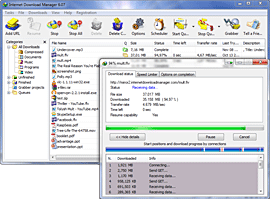
Internet Download Manager (idm)

  Internet Download Manager


(IDM) is a tool to increase download speeds by up to 5 times, resume and schedule downloads. Comprehensive error recovery and resume capability will restart broken or interrupted downloads due to lost connections, network problems, computer shutdowns, or unexpected power outages. Simple graphic user interface makes IDM user friendly and easy to use.Internet Download Manager has a smart download logic accelerator that features intelligent dynamic file segmentation and safe multipart downloading technology to accelerate your downloads. Unlike other download managers and accelerators Internet Download Manager segments downloaded filesdynamically during download process and reuses available connections without additional connect and login stages to achieve best acceleration performance.
                                            
Internet Download Manager supports proxy servers, ftp and http protocols, firewalls, redirects, cookies, authorization, MP3 audio and MPEG video content processing. IDM integrates seamlessly into Microsoft Internet Explorer, Netscape, MSN Explorer, AOL, Opera, Mozilla, Mozilla Firefox, Mozilla Firebird, Avant Browser, MyIE2, and all other popular browsers to automatically handle your downloads. You can also drag and drop files, or useInternet Download Manager from command line. Internet Download Manager can dial your modem at the set time, download the files you want, then hang up or even shut down your computer when it's done.
Other features include multilingual support, zip preview, download categories, scheduler pro, sounds on different events, HTTPS support, queue processor, html help and tutorial, enhanced virus protection on download completion, progressive downloading with quotas (useful for connections that use some kind of fair access policy or FAP like Direcway, Direct PC, Hughes, etc.), built-in download accelerator, and many others.
Version 6.19 adds Windows 8.1 compatibility, adds IDM download panel for web-players that can be used to download flash videos from sites like MySpaceTV, and others. It also features complete Windows 7 and Vista support, video page grabber, redeveloped scheduler, and MMS protocol support. The new version also adds improved integration for IE 11 and IE based browsers, redesigned and enhanced download engine, the unique advanced integration into all latest browsers, improved toolbar, and a wealth of other improvements and new features.

Internet Download Manager (IDM) 6.21 with Crack


Internet Download Manager (IDM) 6.19 Build 3 Keygen and Patch (crack)