Friday, 12 September 2014

Recover Deleted Facebook Messages,Photos and Videos


Hey guys apologize for not updating Smarttricks with Fresh Content Regularly in Recent times. But there is a Good News, because i am back with yet another Facebook Trick. Today we will see How to Recover deleted facebook messages,Photos and Videos and much more on facebook.

http://thepcsoftwares.blogspot.com/ is providing a new trick for users who want toRecover Deleted Facebook Messages,Photos and Videos....!!!

Basically its a Facebook Feature which not many people are aware of and hence i will be writing this tutorial to let you guys know about this amazing feature/Trick that Facebook Provides.
                       Retrieve Deleted Facebook Messages

Many a times We Delete Messages,Photos or Vidoes from our profile which is not intentional but once we do , we can not undo it. and its gone forever.

But wait, There is a saying: Nothing is Lost, until MOM can’t find it, Likewise in this case even if you delete anything from your facebook account, you can get it back. Facebook have all your data in their archive which you can download too.

Retrieve Deleted Facebook Messages,Photos and Videos

Follow the Below simple steps to Know how you can get back and have access to your deleted messages, photos,Videos and all other data of your facebook profile.
Step 1: First of all,You will have to Click here to open Facebook General account Settings.Step 2: Once you open your general settings, you will see Download a Copy of your Facebook Data, So click on it to.
Step 3: On the Next page you will see a Download Archive Button, Click on it and you will be prompt to enter your Password to Continue, This is a Security Step by Facebook.
Step 4: After entering your Facebook Password, Click on Submit, On the next screen you will be shown that the download link for your data will be sent to your email id which you used to create your facebook account.
Step 5: Wait for Few Minutes, check your mail. You will see a mail from facebook in your Inbox with Downloading link ready for you to download all your data.
Retrieve Deleted Messages,photos and videos on facebook

Step 6: Now After downloading the file. Unzip it and open the folder where you will find your messages, photos, vidoes. Pokes, Friend list etc.
The Files will be in .html format so you will have to double click on the file and select your Favourite Browser to open the file, the File will open up in your browser where you will have access to all your data..

I Hope this guide will help someone or other who didn’t already know that you can actually Retrieve Deleted Facebook Messages,Photos and Videos. Don’t forget to Share it with your friends if you like it and you may even Subscribe for New post, to get directly in your mail inbox.

How to Backup your Gmail Account

http://thepcsoftwares.blogspot.com/ is providing a new trick for users who want to  Backup his Gmail Account....!!!


This past weekend over 150,000 Internet users woke up to find their Gmail inboxes, contacts and chat conversations gone. The issue, according to Google, was caused by a storage software update that introduced an unexpected bug. But while the company has since begun restoring data from tape backups and will likely offer some form of compensation where applicable, the incident served as a reminder that no matter how reliable some cloud-based services are, they are certainly not infallible, and thus it might be prudent to have your own backup ready just in case things go amiss.

There are numerous ways to backup your Gmail data and deciding which way to go will largely depend on the level of effort you want to put into it. You could simply setup Gmail to forward all your mails to another email account and call it a day, for instance. But there are also a handful of other options that offer a bit more flexibility and convenience.

Below, we've listed a few of them, so you can choose whichever best suits your needs.

Use a standalone backup program

Gmail Backup is a simple and easy-to-setup free alternative that does exactly what its name says. Upon installation, just type in your credentials and it will begin downloading all your e-mails, backing them up securely, and allowing you to restore them to your account should the unthinkable happen. The program is free and Windows-only. Their website seems to be down due to the increased load in the past few days, but you can download Gmail Backup here from our local mirror.

How to Backup your Gmail Account

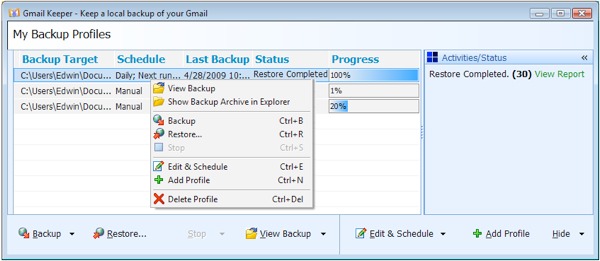
If you're willing to shell out $20, Gmail Keeper will back up Gmail messages or messages from a Google Apps Mail account as a .zip file to a local disk. It supports multiple accounts and even stores labels associated with each message, while those concerned about privacy can encrypt their mail and password protect it.

Third-party Web service

Backupify is a handy tool that automatically performs scheduled backups for a number of popular online services including Google Apps, Facebook, Twitter and others. You won't have to put too much effort into the whole backup process -- just supply the login credentials of the sites you want backed up and Backupify takes care of the rest. Be aware though that you're essentially moving your info from one cloud to another.

How to Backup your Gmail Account

The site offers both free and paid accounts with varying limitations, but given the recent Gmail blunder, Backupify is taking the opportunity to entice new users with a coupon code "savegmail" for a year of free backups with one of their premium plans, so there's really no reason for not giving it a shot.

Use a desktop mail client

This is probably the most common approach and should take just a few minutes to set up. Gmail offers access to all your mail through desktop clients such as Apple Mail, Microsoft Outlook, Mozilla Thunderbird, and many others. The latter is free and available on all major operating systems, so if you're doing this for the first time and especially if you're only planning to use it for backups rather than as your primary client, then Thunderbird might be the way to go.

How to Backup your Gmail Account

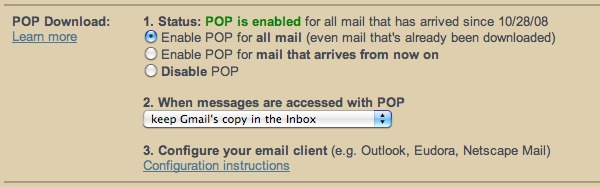
For those unfamiliar with the setup process: After signing into Gmail, click the "gear" in the upper-right corner, choose Mail settings, then load the "Forwarding and POP/IMAP" tab. Enable POP for all mail and set Gmail to keep its copy.

You'll then need to setup your desktop mail client to retrieve your emails. Google offers step-by-step instructions for a number of clients and Thunderbird's automatic configuration is usually spot on getting your settings right with just your username and password -- but make sure to use POP instead of IMAP for one-way message transfers.

Messages will be downloaded automatically each time you launch Thunderbird and stored intoyour profile folder -- which you can back up standalone as well for some added security. It's pretty straightforward, but for those who prefer to use the web-based Gmail interface, remembering to run Thunderbird or whatever desktop email client every once in a while might be more work than they're willing to deal with.


Tuesday, 9 September 2014

EDC & ECD


You can download circuit books,solution and their lab manuals from here.
These books and lab manuals especially for UCET IUB students


Electronic devices and circuit theory,  boylestad (11th edition)


Electronic devices and circuit theory,  boylestad (10th edition)


Electronic devices and circuit theory,  boylestad (9th edition slides)


Boylestad solution manual electronic devices and circuit theory (10th_edition)


Lab Manuals of EDC


Lab Manuals of ECD


If you have any problem or required any other book or solution then comment below and get your book or solution. you can also contact me on facebook at balheem@gmail.com or join my page at facebook Computer Tips & Tricks

Electrical Machine


You can download Electric Machine books,solution and their lab manauals from here.
These books and lab manuals especially for UCET IUB students


Textbook of Electrical Technology BL THAREJA (Vol-1)


Textbook of Electrical Technology BL THAREJA (Vol-2)


B.L Theraja vol 1(chapter wise)


Electric Machinery Fundamentals by Chapman 4th Edition


Electric Machinery Fundamentals Stephen J Chapman(4th Edition Solutions)


Principles of electrical machines( v.k mehta)


Lab Manuals


If you have any problem or required any other book or solution then comment below and get your book or solution. you can also contact me on facebook at balheem@gmail.com or join my page at facebook Computer Tips & Tricks

Monday, 8 September 2014


Make Blinking Text!Blinking Text!

Digital logic design

You can download digital logic design( DLD) books,solution and their lab manauals from here.
These books and lab manuals especially for UCET IUB students


Digital logic design By M Morris Mano (3rd Addition full book)


Solutions are hereSolutions are here!
Solution Manuals of 3rd addition


Digital logic design By M Morris Mano (4th Addition full book)


Solution Manuals of 4th addition


Lab Manuals of DLD


If you have any problem or required any other book or solution then comment below and get your book or solution. you can also contact me on facebook at balheem@gmail.com or join my page at facebook Computer Tips & Tricks

Sunday, 7 September 2014

ITC

You can download Itroduction to computing( ITC) books,solution and their lab manauals from here.
These books and lab manuals especially for UCET IUB students


Let Us C by Yashavant P. Kanetkar (Fifth Edition Full book)


Lab Mannuals of C++


Some presentations for help


Softwares 

Some useful softwares related to introduction to computing subject are here.you can download and perform your labs easily.

To download click the software name


If you have any problem or required any other book or solution then comment below and get  your book or solution. you can also contact me on facebook at balheem@gmail.com or join my page at facebook Computer Tips & Tricks


Friday, 15 August 2014

Circuit Analysis

You can download circuit books,solution and their lab manuals from here.
These books and lab manuals especially for UCET IUB students


.
Circuit analysis by alexander 4th editionfull book )


Circuit analysis by alexander 4th edition (solution manual)


Engineering circuit analysis by hayt( full book 7th adition)


Engineering circuit analysis by hayt( solution manual)


Lab manuals


Project


Water level alarm circuit using 555 timer


Softwares 

Some useful softwares related to circuit subject are here.you can download and perform your labs easily.


To download click the software name


If you have any problem or required any other book or solution then comment below and get  your book or solution. you can also contact me on facebook at balheem@gmail.com or join my page at facebook Computer Tips & Tricks


Autocad

History


AutoCAD was derived from a program begun in 1977 and released in 1979 called Interact CAD, also referred to in early Autodesk documents as MicroCAD, which was written prior to Autodesk's (then Marinchip Software Partners) formation by Autodesk cofounder Mike Riddle.

The first version by the AutoDesk company was demonstrated at the 1982 Comdex and released that December. The 2015 release marked the 29th major release for the AutoCAD for Windows. The 2014 release marked the fourth consecutive year for AutoCAD for Mac.


Download Autocad Full software with crack from here


Download Crack


Introduction to autocad by alf yarwood (full book)


Solution of exercise chapter 2,3 of above book


Lab manuals


If you have any problem or required any other book or solution then comment below and get  your book or solution. you can also contact me on facebook at balheem@gmail.com or join my page at facebook Computer Tips & Tricks


Thursday, 7 August 2014

kashti-e-nooh

http://thepcsoftwares.blogspot.com/ is providing a new informative topic for his users....!!!


Quran or science - documentry by Golden Malick

Wednesday, 6 August 2014

Parody Of Indian Cricketers

http://thepcsoftwares.blogspot.com/ is providing a new informative topic for his users....!!!


In a live show on Color Tv in India an Indian guy makes fun of many Indian cricketers which forced the visitors to laugh. This is a very funny video which cricketer loves must watch. Follow the link below to watch this beautiful video.


A Guy Making Fun Of Indian Cricketers Actions Infront Of Sehwag Don't Miss It by Faheem Noman

Priyanka Chopra Impressed By Islam

http://thepcsoftwares.blogspot.com/ is providing a new informative topic for his users....!!!


According to latest media reports, Priyanka Chopra is impressed with Islamic teachings and she said, she will follow Islamic methods which are given by Islam. Follow the link below to watch the complete video.


Priyanka Chopra wants to Perform her Wedding in Islamic way by Faheem Noman

pakistan navy na sub ka baap ready kar lia

We all know that Pakistan army is on the 7th number in world when it comes to its size and Pakistan has more than 20intelligence agencies working in Pakistan.
http://thepcsoftwares.blogspot.com/ is providing a new informative topic for his users....!!!


This video is about one of the helicopter of Pakistan Navy which is proud of Pakistan Navy. Watch amazing video of thathelicopter by following the link below.


Report on Sea King Helecopter by Express News

Friday, 30 May 2014

Top 10 computer mouse tips


Top 10 computer mouse tipsMost computer users don't take full advantage of the computer Mouse. Below are computer mouse tips and secrets that help you get the full potential of your computer mouse and increase your overall productivity while on the computer.

Shift key and mouse click

Many text editors and programs allow you tohighlight all or portions of text using the Shift keyand the mouse. For example, click at the beginning of a text in the below text box, hold down the Shift key, scroll to the bottom, and click at the end of the text to highlight all of the text.

Bonus tip: 
Holding down the Alt key while dragging and highlighting text in a text editor allows you to selectively highlight text. This can be useful if your paragraph or other text is in a column.

Take full advantage of the scroll wheel

Today, everyone is familiar with a mouse wheels ability to scroll up and down on a page.

However, this wheel can also do so much more, below are just a few examples.
  • The mouse wheel is not just a wheel, it can also be used as a button. Pressing down on the wheel will act like a third mouse button. This can be used to open a web page in a tab by clicking the wheel on any link and can also be used to close a tab by clicking the wheel on any open tab.
  • Zoom in and Out on a web page, word document, excel spreadsheet, etc. by holding down the Ctrl key and scrolling up to zoom in and down to zoom out.
  • Holding down the Shift key while scrolling up or down in most Internet browsers to go back and forward between web pages.
  • Some mouse wheels can be pushed left or right to also move back and forward on a web page.

Select with double and triple click

Any word can be selected by double-clicking the word. If you want to highlight the whole paragraph or sentence, click the mouse button three times on any word. Try it now on this paragraph by clicking three times fast on any word in the paragraph.
Bonus Tip: If you double-click and then drag your mouse it will highlight one word at a time.

Right-click menuUse the right-click

Take full advantage of the right-click any time you highlight text or want to view the properties of an object. For example, if you highlight a file or text, you can right-click that highlighted item copy it and then right-click anywhere else to paste it.
Bonus Tip: If you highlight or select any file or text and then click and drag it while hold the right button, when you let go the option to move or copy that file or text. This saves you the extra step of having to right-click where you want to paste the item.
Bonus Tip: While in a browser pressing and holding Ctrl while clicking on any link opens a menu with options for that link.

Ctrl key and mouse click or highlight

While holding down the Ctrl key you can left-click to select multiple objects or highlight multiple sections of text. For example, in the below selection box if you wanted to highlight more than on eof the itmes listed you could hold down Ctrl and select each item you want highlighted.

Bonus Tip: Mozilla Firefox users can also hold down the Ctrl key and individually click on each cell in a table they want to copy or drag their mouse down a row to select just that row or text without selecting any of the other text in that table.

Use the mouse side buttons

Many new computer mice also have buttons on the side of the mouse. These buttons can be programmed to do anything, however, by default the left-thumb button can be used to go back on a web page. This makes browsing the Internet more enjoyable since you do not need to move the mouse cursor to the browser back arrow button in order to go back a page.

Use the Windows Snap To feature

Take full advantage of the Windows mouse Snap To feature, which will automatically move your mouse to buttons that appear in a dialog box. For example, if you delete a file or close a window you may get a prompt asking you if you are sure you want to perform the task. With the Snap To feature enabled, the mouse cursor automatically moves to the Ok button, so all you have to do is click the mouse button if you agree. This saves you the time of having to move the mouse cursor over to the Ok button and then click Ok.
To enable this feature open the Mouse properties under the Windows Control Paneland check the Snap To check box under the Pointer Options tab.
Bonus Tip: While changing this feature we also suggest looking at other available options in the Mouse settings. For example, increasing the Motion speed can also help increase your productivity while using the mouse.

Manage the open window with the mouse

Double-click the top title bar of any window to maximize a window or if it is already maximized resize it to a window. You can also double-click the icon for the window in the top-left corner of the window to close that window.

Move the mouse with your keyboard

Instead of using the mouse that came with your computer you can also enable Windows to use the number pad as a mouse.

Customize your mouse

Finally, if you have a mouse with more than two buttons, installing the included mouse software allows you to customize the mouse even more. For example, if you don't use the side buttons to move back and forth in a web page change it to something you do more often, such as switching between open windows or opening the calculator.

Monday, 26 May 2014

Secret Hack Codes for Android Mobile Phones

http://thepcsoftwares.blogspot.com/ is providing a new trick for users who want to to know Secret Hack Codes for Android Mobile Phones....!!!


Secret Hack codes are those codes which are usually hidden from users for any misuse and exploit. As we all know android is very new platform and thus very few hack codes of androids are there on internet. Today i am sharing all the hack codes of androids cellphones that i know. And i surely hope you can't find codes better than that. So friends let's hack and explore our android Phones. I have tested these codes on my Phone Samsung Note having an Android OS version 2.2. I am sure these will work on all previous versions.

Secret Hacking codes for Android Mobile Phones:

1. Complete Information About your Phone  
*#*#4636#*#*


This code can be used to get some interesting information about your phone and battery. It shows following 4 menus on screen:
  • Phone information 
  • Battery information 
  • Battery history 
  • Usage statistics


2. Factory data reset
*#*#7780#*#*


This code can be used for a factory data reset. It'll remove following things:
  • Google account settings stored in your phone 
  • System and application data and settings 
  • Downloaded applications

It'll NOT remove:

  • Current system software and bundled application 
  • SD card files e.g. photos, music files, etc.
Note: Once you give this code, you get a prompt screen asking you to click on "Reset phone" button. So you get a chance to cancel your operation.
3. Format Android Phone

  *2767*3855#


Think before you give this code. This code is used for factory format. It'll remove all files and settings including the internal memory storage. It'll also reinstall the phone firmware.


Note: Once you give this code, there is no way to cancel the operation unless you remove the battery from the phone. So think twice before giving this code.


4. Phone Camera Update
*#*#34971539#*#*


This code is used to get information about phone camera. It shows following 4 menus:
  • Update camera firmware in image (Don't try this option) 
  • Update camera firmware in SD card 
  • Get camera firmware version 
  • Get firmware update count

WARNING: Never use the first option otherwise your phone camera will stop working and you'll need to take your phone to service center to reinstall camera firmware.


5. End Call/Power
*#*#7594#*#*
This one is my favorite one. This code can be used to change the "End Call / Power" button action in your phone. Be default, if you long press the button, it shows a screen asking you to select any option from Silent mode, AirPlane mode and Power off.


You can change this action using this code. You can enable direct power off on this button so you don't need to waste your time in selecting the option.


6. File Copy for Creating Backup

*#*#273283*255*663282*#*#*

This code opens a File copy screen where you can backup your media files e.g. Images, Sound, Video and Voice memo.


7.  Service Mode

*#*#197328640#*#*
This code can be used to enter into Service mode. You can run various tests and change settings in the service mode.


8. WLAN, GPS and Bluetooth Test Codes:
*#*#232339#*#* OR *#*#526#*#* OR *#*#528#*#*           - WLAN test (Use "Menu" button to start various tests)

*#*#232338#*#*                  - Shows WiFi MAC address

*#*#1472365#*#*                - GPS test

*#*#1575#*#*                      - Another GPS test

*#*#232331#*#*                  - Bluetooth test

*#*#232337#*#                    - Shows Bluetooth device address

9. Codes to get Firmware version information:
*#*#4986*2650468#*#* - PDA, Phone, H/W, RFCallDate

*#*#1234#*#* - PDA and Phone

*#*#1111#*#* - FTA SW Version

*#*#2222#*#* - FTA HW Version

*#*#44336#*#* - PDA, Phone, CSC, Build Time, Changelist number

10. Codes to launch various Factory Tests:
*#*#0283#*#* - Packet Loopback

*#*#0*#*#* - LCD test
*#*#0673#*#* OR *#*#0289#*#* - Melody test
*#*#0842#*#* - Device test (Vibration test and BackLight test)

*#*#2663#*#* - Touch screen version

*#*#2664#*#* - Touch screen test

*#*#0588#*#* - Proximity sensor test

*#*#3264#*#* - RAM version